
PostgreSQL uses a cost-based optimizer (CBO) to determine the best execution plan for a given query. The optimizer considers multiple alternative plans during the planning phase. Using the EXPLAIN command, a user can only inspect the chosen plan, but not the alternatives that were considered. To address this gap, I developed pg_plan_alternatives, a tool that uses eBPF to instrument the PostgreSQL optimizer and trace all alternative plans and their costs that were considered during the planning phase. This information helps the user understand the optimizer’s decision-making process and tune system parameters. This article explains how pg_plan_alternatives works, provides examples, and discusses the insights the tool can provide.
Cost-Based Optimization
SQL is a declarative language, which means that users only specify what they want to achieve, but not how to achieve it. For example, should the query SELECT * FROM mytable WHERE age > 50; perform a full table scan and apply a filter, or should it use an index (see the following blog post for more details about this)? The optimizer of the database management system is responsible for determining the best execution plan to execute a given query. During query planning, the optimizer generates multiple alternative plans. Many DBMSs perform cost-based optimization, where each plan is qualified with a cost estimate, a numerical value representing the estimated resource usage (e.g., CPU time, I/O operations) required to execute the plan. The optimizer then selects the plan with the lowest estimated cost as the final execution plan for the query.
To calculate the costs of the plan nodes, the optimizer uses a cost model that accounts for factors such as the number of rows predicted to be processed (based on statistics and selectivity estimates) and constants.
Query Plans in PostgreSQL
Using the EXPLAIN command in PostgreSQL, you can see the final chosen plan and its estimated total cost, and the costs of the individual plan nodes. For example, using EXPLAIN (VERBOSE, ANALYZE) SELECT * FROM test1 WHERE id = 5;, the query plan of the given select query is shown:
jan2=# EXPLAIN (VERBOSE, ANALYZE) SELECT * FROM test1 WHERE id = 5;
 QUERY PLAN
------------------------------------------------------------------------------------------------------------------------------
 Index Only Scan using test1_pkey on public.test1  (cost=0.28..8.29 rows=1 width=4) (actual time=0.153..0.160 rows=1 loops=1)
   Output: id
   Index Cond: (test1.id = 5)
 Heap Fetches: 1
 Planning Time: 1.166 ms
 Execution Time: 0.284 ms
(6 rows)
The plan consists of only one Index Only Scan node, with an estimated total cost of 0.28..8.29, which means that the startup cost is 0.28 and the total cost is 8.29. The startup cost is the cost of getting the first row, while the total cost is the cost of getting all rows.
A more complex example with a join might look like this:
jan2=# EXPLAIN (VERBOSE, ANALYZE) SELECT * FROM test1 LEFT JOIN test2 ON (test1.id = test2.id);
 QUERY PLAN
-------------------------------------------------------------------------------------------------------------------------
 Hash Left Join (cost=27.50..45.14 rows=1000 width=8) (actual time=0.625..1.422 rows=1000 loops=1)
   Output: test1.id, test2.id
 Inner Unique: true
   Hash Cond: (test1.id = test2.id)
 ->  Seq Scan on public.test1  (cost=0.00..15.00 rows=1000 width=4) (actual time=0.038..0.220 rows=1000 loops=1)
         Output: test1.id
 ->  Hash (cost=15.00..15.00 rows=1000 width=4) (actual time=0.571..0.572 rows=1000 loops=1)
         Output: test2.id
 Buckets: 1024  Batches: 1 Memory Usage: 44kB
 ->  Seq Scan on public.test2  (cost=0.00..15.00 rows=1000 width=4) (actual time=0.019..0.191 rows=1000 loops=1)
               Output: test2.id
 Planning Time: 3.436 ms
 Execution Time: 1.551 ms
(13 rows)
In this case, the plan consists of a Hash Left Join node with an estimated cost of 27.50..45.14. The plan also contains two Seq Scan nodes with estimated costs of 15.00..15.00, one for each of the test1 and test2 tables. Furthermore, a Hash node is used to build a hash table for test2; its cost remains 15.00..15.00.
Structure of a Query Plan
Like most database management systems, PostgreSQL uses a tree of plan nodes to organize the data processing. Each node represents a specific operation (e.g., scan, join, aggregate), requests data from its child nodes as input tuples (like an iterator), and provides the operation’s result as output. The child nodes usually read the data of tables, and the root node provides the final result of the query. The interface of the nodes is standardized, which means that the nodes can be easily combined to create different plans (see the open-next-close protocol). Most nodes just let tuples pass in a streaming manner and work on only one tuple at a time. However, some nodes, like the sort operations, have to read the entire input of the child node before they can emit the first output tuple.
Another representation of the plan is the following, which shows the plan nodes and their relationships in a graph format:
Trace Plan Alternatives using pg_plan_alternatives
For all queries, the optimizer considers multiple alternative plans during the planning phase. However, PostgreSQL does not provide a way to inspect these alternatives. This is where pg_plan_alternatives comes into play.
pg_plan_alternatives uses eBPF (Extended Berkeley Packet Filter) to instrument the PostgreSQL optimizer. eBPF allows loading custom programs into the kernel and attaching them to various events, such as function calls. By attaching an eBPF program to the add_path function of the PostgreSQL optimizer, the tool can capture all the alternative paths that are generated and considered. Paths are an early lightweight representation of a plan node during query planning. Such a path consists of an operator, the estimated costs, and the number of tuples the node is expected to process.
High-Level Architecture of pg_plan_alternatives
pg_plan_alternatives consists of three main components:
- An eBPF program that runs in kernel space.
- A user-space script,
pg_plan_alternatives, that collects events emitted by the eBPF program and loads the eBPF program into the kernel. - A visualization script,
visualize_plan_graph, that takes the collected events and visualizes the alternative plans.
(kernel space)"] B["pg_plan_alternatives
(user space)"] C["PostgreSQL
(user space)"] D["visualize_plan_graph
(user space)"] A -->|attaches to| C A -->|emits events| B B -->|visualizes| D
The pg_plan_alternatives Python script, which runs in user space, collects the data emitted by the eBPF program and prints the received events. These events can then be visualized using the visualize_plan_graph script, which is also part of the pg_plan_alternatives project. The visualization shows the alternative plans and their costs in a graph format, which makes it easier to understand the decision-making process of the optimizer.
Capturing Paths During Query Planning
Capturing the plans directly at the moment they are generated is necessary, since there is no point in time when all the alternative query plans are available in memory. The optimizer removes alternatives that are not promising directly using pfree and only keeps the most promising ones (e.g., those with lower estimated costs). When the query planning is done, a second probe is attached to the create_plan function, which is responsible for creating the final execution plan. This allows pg_plan_alternatives to determine which of the alternatives was finally chosen by the optimizer.
Handling Function Parameters in eBPF
A challenge is dealing with the function parameters in the eBPF program, since PostgreSQL structs like Path are opaque to eBPF. The function parameters are therefore pointers to opaque data structures, but the eBPF program needs to access certain fields (e.g., the type of the path or the costs).
There are three approaches to this problem:
-
Copy PostgreSQL structs from the source code into the eBPF program. This is possible because both are written in C. However, eBPF supports a limited set of datatypes, and complex struct members (such as pointers to other structs) must be resolved and converted to simple data types, which requires considerable work.
-
Hard-code the byte offsets of the fields. Like the previous approach, this makes the tool fragile and less robust to changes in the PostgreSQL codebase.
-
The approach used by
pg_plan_alternativesis to analyze the PostgreSQL binary and extract the offsets of the relevant struct fields using DWARF debug information. This debug information lets the plan tracer determine the byte offset of each field. These offsets are extracted by the user-space part ofpg_plan_alternativesand provided to the eBPF program using#definedirectives. With these offsets, the eBPF program can locate the relevant fields and read the necessary information. Extracting offsets dynamically allowspg_plan_alternativesto adapt to different PostgreSQL versions without changing the eBPF program.
Insights from pg_plan_alternatives
The insights that pg_plan_alternatives provides can be used in several places.
-
The PostgreSQL planner can be tuned using configuration parameters such as
random_page_costorcpu_tuple_cost. These parameters feed into the cost functions and influence the planner’s estimates; they should match the actual system environment so the optimizer can make good decisions. Usingpg_plan_alternatives, you can see which alternatives are considered and how close their costs are. -
Extension developers who rewrite query plans during the planning phase should be aware of the alternatives considered by the optimizer, since their code must handle all relevant cases correctly.
pg_plan_alternativeshelps visualize the alternatives generated by the optimizer.
Examples
In this section examples of how pg_plan_alternatives can be used to gain insights into PostgreSQL’s query planning process. All examples below use two tables, each with 1000 rows and up-to-date statistics:
CREATE TABLE test1(id INTEGER PRIMARY KEY);
CREATE TABLE test2(id INTEGER PRIMARY KEY);

INSERT INTO test1 SELECT generate_series(1, 1000);
INSERT INTO test2 SELECT generate_series(1, 1000);

ANALYZE;
The pg_plan_alternatives tracer can be installed using the following command:
pip install pg_plan_alternatives
Simple SELECT Query
To inspect the alternative plans for a simple SELECT query, the query tracer can be started as follows:
sudo pg_plan_alternatives -x /home/jan/postgresql-sandbox/bin/REL_17_1_DEBUG/bin/postgres -n $(pg_config --includedir-server)/nodes/nodetags.h
The -x parameter specifies the path to the PostgreSQL binary that should be instrumented, while the -n parameter specifies the path to the nodetags.h header file, which contains the definitions of the plan node types. When no -p parameter is specified, the tool will trace all running processes for that binary. After starting the tracer, the following query can be executed:
SELECT * FROM test1;
The tracer should show an output as follows:
================================================================================
PostgreSQL Plan Alternatives Tracer
Binary: /home/jan/postgresql-sandbox/bin/REL_17_1_DEBUG/bin/postgres
Tracing all PostgreSQL processes
================================================================================

Received event: PID=3917080, Type=ADD_PATH, PathType=T_SeqScan
[20:14:54.116] [PID 3917080] ADD_PATH: T_SeqScan (startup=0.00, total=15.00, rows=1000, parent_rti=1, parent_oid=26144)
Received event: PID=3917080, Type=ADD_PATH, PathType=T_IndexOnlyScan
[20:14:54.118] [PID 3917080] ADD_PATH: T_IndexOnlyScan (startup=0.28, total=43.27, rows=1000, parent_rti=1, parent_oid=26144)
Received event: PID=3917080, Type=ADD_PATH, PathType=T_BitmapHeapScan
[20:14:54.118] [PID 3917080] ADD_PATH: T_BitmapHeapScan (startup=25.52, total=40.52, rows=1000, parent_rti=1, parent_oid=26144)
Received event: PID=3917080, Type=ADD_PATH, PathType=T_SeqScan
[20:14:54.118] [PID 3917080] ADD_PATH: T_SeqScan (startup=0.00, total=15.00, rows=1000, parent_oid=26144)
Received event: PID=3917080, Type=CREATE_PLAN, PathType=T_SeqScan
[20:14:54.118] [PID 3917080] CREATE_PLAN: T_SeqScan (startup=0.00, total=15.00) [CHOSEN]
The output already gives insights into the planning process. For example, the optimizer considered three different plans for scanning the test1 table: a SeqScan, an IndexOnlyScan, and a BitmapHeapScan. The costs of these plans are shown. When the CREATE_PLAN event is emitted, the SeqScan plan was chosen by the optimizer, which is also reflected in the EXPLAIN output of the query:
jan2=# EXPLAIN (VERBOSE, ANALYZE) SELECT * FROM test1;
 QUERY PLAN
-------------------------------------------------------------------------------------------------------------
 Seq Scan on public.test1  (cost=0.00..15.00 rows=1000 width=4) (actual time=0.119..0.291 rows=1000 loops=1)
   Output: id
 Planning Time: 0.855 ms
 Execution Time: 0.437 ms
(4 rows)
To visualize the alternatives, the tracer output can be formatted as JSON and stored in a file. To run pg_plan_alternatives in that mode, the following command can be used:
$ sudo pg_plan_alternatives -x /home/jan/postgresql-sandbox/bin/REL_17_1_DEBUG/bin/postgres -n $(pg_config --includedir-server)/nodes/nodetags.h -j -o examples/select.json
The SELECT SQL query should be repeated while the tracer is running to capture the events. After that, the visualize_plan_graph script can be used to visualize the alternatives:
$ visualize_plan_graph -i examples/select.json -o examples/select.svg --db-url psql://localhost/jan2 -v
This produces an .svg file with the following content:
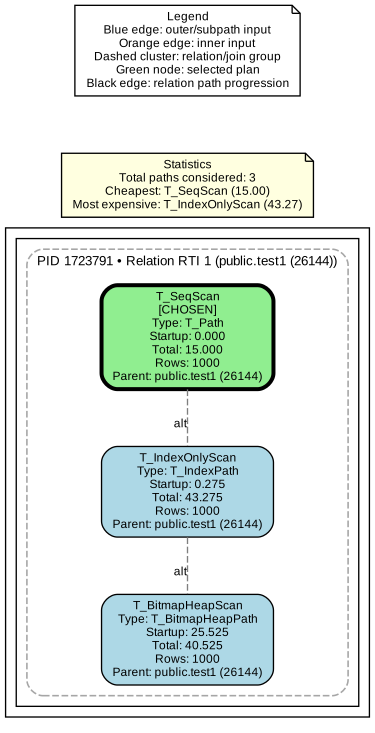
The graph shows all nodes considered for scanning the base relation test1 and their costs. The green T_SeqScan node is the one finally chosen by the optimizer, with costs of 0.00..15.00, while the gray-blue nodes are the alternatives considered but not chosen.
SELECT Query with WHERE Clause
The second example is a SELECT query with a WHERE clause. In this example, the pg_plan_alternatives tracer should be started as in the previous example. The query in this example is as follows:
SELECT * FROM test1 WHERE id = 5;
PostgreSQL will choose an Index Only Scan for this query, since there is an index on the id column. The EXPLAIN output of the query should look as follows:
jan2=# EXPLAIN (VERBOSE, ANALYZE) SELECT * FROM test1 WHERE id = 5;
 QUERY PLAN
------------------------------------------------------------------------------------------------------------------------------
 Index Only Scan using test1_pkey on public.test1  (cost=0.28..8.29 rows=1 width=4) (actual time=0.153..0.160 rows=1 loops=1)
   Output: id
   Index Cond: (test1.id = 5)
 Heap Fetches: 1
 Planning Time: 1.166 ms
 Execution Time: 0.284 ms
(6 rows)
The output of the plan visualization should look as follows:
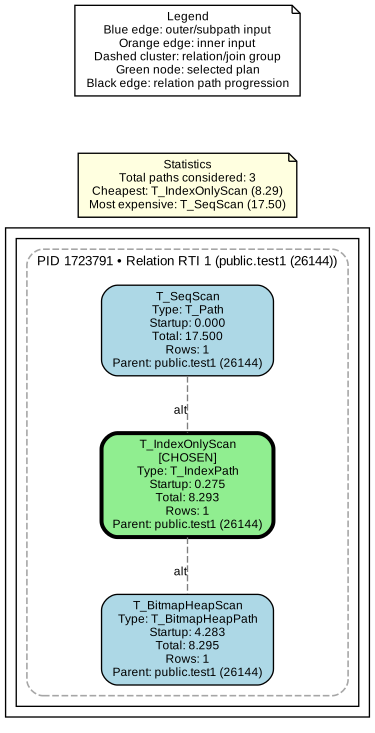
The same nodes as in the previous example are shown, but now the T_IndexOnlyScan node is the one that was chosen by the optimizer with costs of 0.28..8.29, while the T_SeqScan and T_BitmapHeapScan nodes are the alternatives that were considered but not chosen.
SELECT Query with ORDER BY Clause
The third example is a SELECT query with an ORDER BY clause. The example query is as follows:
SELECT * FROM test1 ORDER BY id;
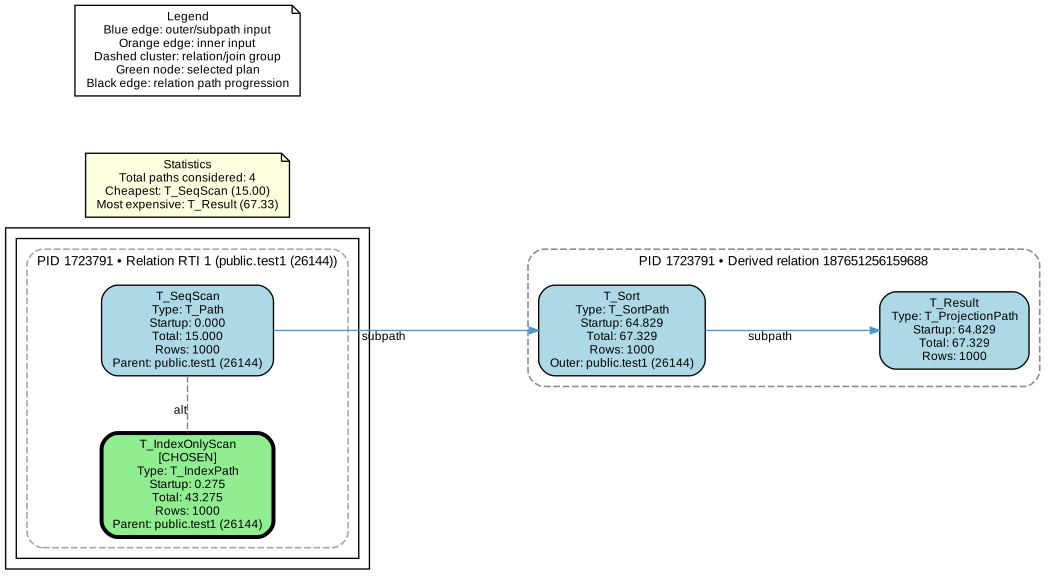
The EXPLAIN output of the query shows that an Index Only Scan is used to scan the test1 table, which is also used to return the rows in the correct order.
EXPLAIN (VERBOSE, ANALYZE) SELECT * FROM test1 ORDER BY id;
 QUERY PLAN
-------------------------------------------------------------------------------------------------------------------------------------
 Index Only Scan using test1_pkey on public.test1  (cost=0.28..43.27 rows=1000 width=4) (actual time=0.192..5.385 rows=1000 loops=1)
   Output: id
 Heap Fetches: 1000
 Planning Time: 1.167 ms
 Execution Time: 5.579 ms
(5 rows)
However, this time the optimizer also considered producing the result by performing a Seq Scan and then sorting the output using a T_Sort node. This is followed by a T_Result node, an internal PostgreSQL node used for operations such as applying a projection. Since the costs of this path are higher than the Index Only Scan path, it was not chosen by the optimizer.
SELECT Query with GROUP BY Clause
The fourth example is a SELECT query with a GROUP BY clause. This time, a simple COUNT aggregation is performed, and a GROUP BY is applied on the id column. The example query is as follows:
SELECT id, COUNT(*) FROM test1 GROUP BY id;
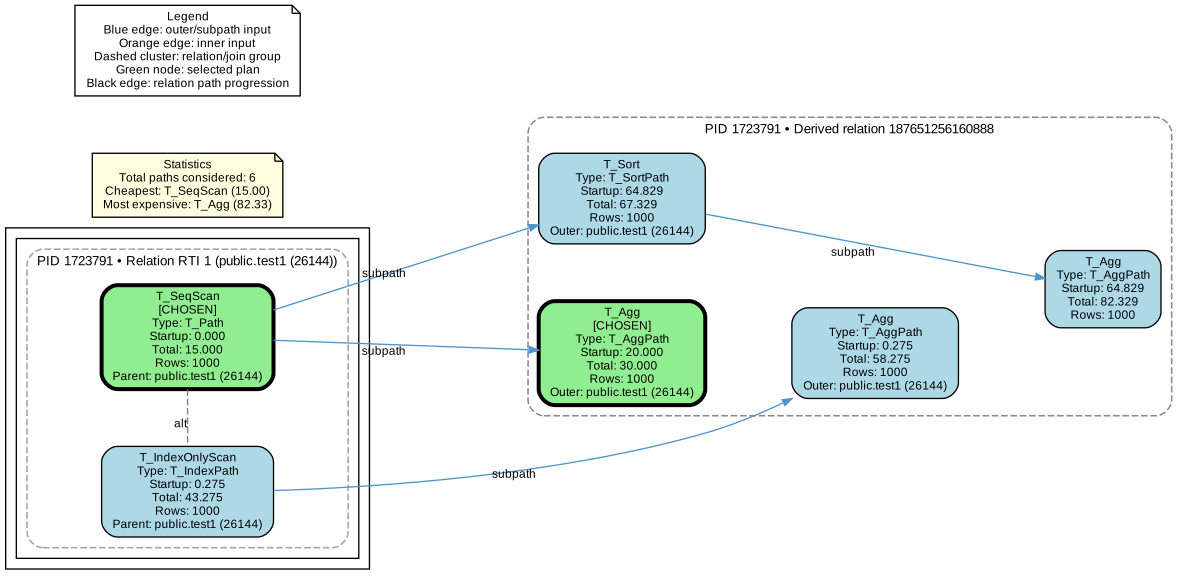
The EXPLAIN output of the query shows that a HashAggregate node is used to perform the aggregation, which is fed by a Seq Scan node that scans the test1 table. The HashAggregate node has an estimated cost of 20.00..30.00.
jan2=# EXPLAIN (VERBOSE, ANALYZE) SELECT id, COUNT(*) FROM test1 GROUP BY id;
 QUERY PLAN
-------------------------------------------------------------------------------------------------------------------
 HashAggregate  (cost=20.00..30.00 rows=1000 width=12) (actual time=3.171..4.009 rows=1000 loops=1)
   Output: count(*), id
 Group Key: test1.id
   Batches: 1 Memory Usage: 193kB
 ->  Seq Scan on public.test1  (cost=0.00..15.00 rows=1000 width=4) (actual time=0.176..0.769 rows=1000 loops=1)
         Output: id
 Planning Time: 2.297 ms
 Execution Time: 4.637 ms
(8 rows)
The plan visualization shows that the optimizer also considered aggregating on top of an Index Only Scan; sorting the result of the Seq Scan and then aggregating was also considered. Since the costs of these alternatives are higher than the chosen plan, they were not selected. The chosen plan has a total cost of 30.00, while the two alternatives have total costs of 58.28 and 82.33.
JOIN Query
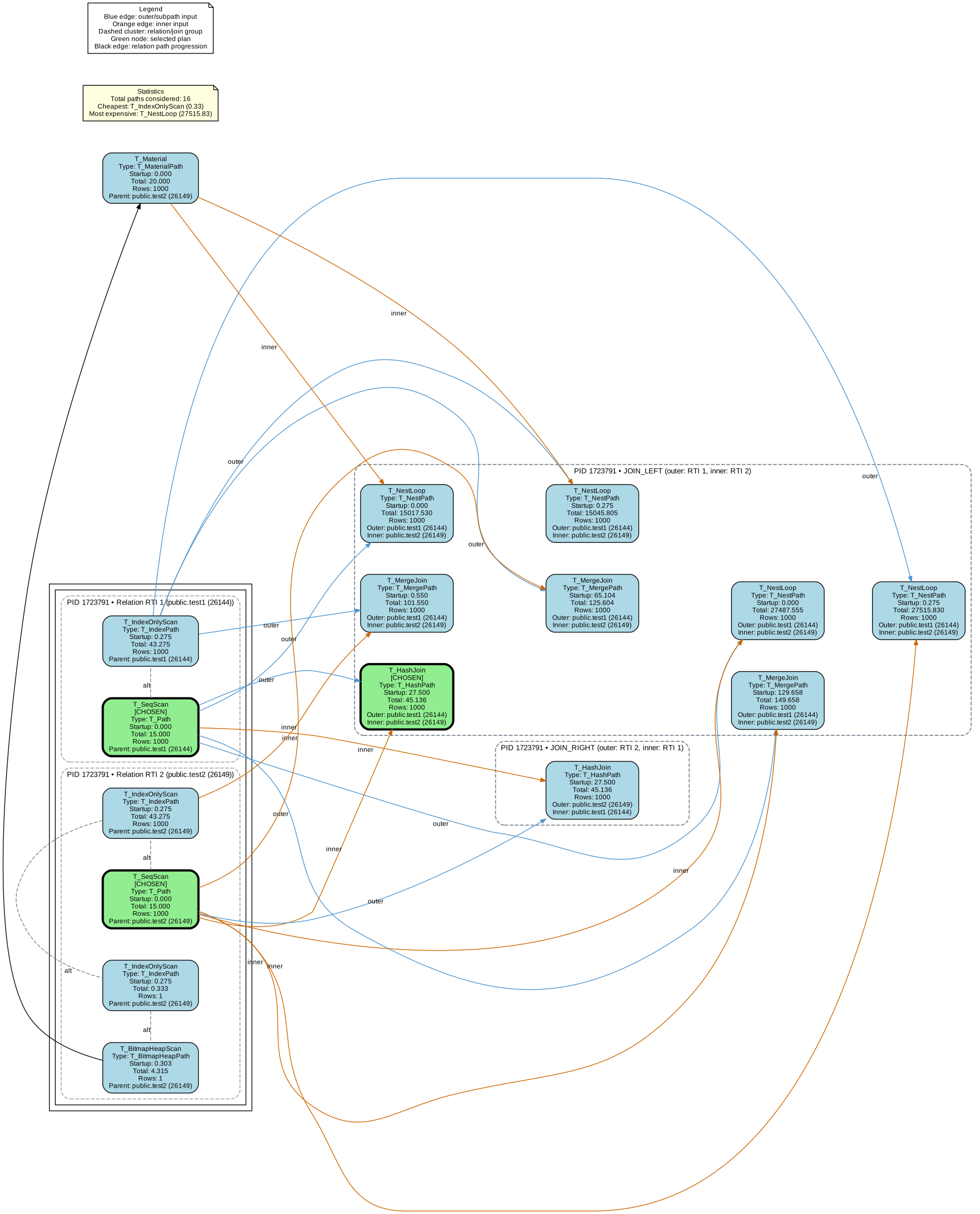
The fifth example is a JOIN query, which joins the test1 and test2 tables on the id column. The query used in this example is:
SELECT * FROM test1 LEFT JOIN test2 ON (test1.id = test2.id);
The EXPLAIN output of the query shows that a Hash Left Join is used to perform the join, which is fed by two Seq Scan nodes that scan the test1 and test2 tables. The Hash Left Join node has an estimated cost of 27.50..45.14.
jan2=# EXPLAIN (VERBOSE, ANALYZE) SELECT * FROM test1 LEFT JOIN test2 ON (test1.id = test2.id);
 QUERY PLAN
-------------------------------------------------------------------------------------------------------------------------
 Hash Left Join (cost=27.50..45.14 rows=1000 width=8) (actual time=0.625..1.422 rows=1000 loops=1)
   Output: test1.id, test2.id
 Inner Unique: true
   Hash Cond: (test1.id = test2.id)
 ->  Seq Scan on public.test1  (cost=0.00..15.00 rows=1000 width=4) (actual time=0.038..0.220 rows=1000 loops=1)
         Output: test1.id
 ->  Hash (cost=15.00..15.00 rows=1000 width=4) (actual time=0.571..0.572 rows=1000 loops=1)
         Output: test2.id
 Buckets: 1024  Batches: 1 Memory Usage: 44kB
 ->  Seq Scan on public.test2  (cost=0.00..15.00 rows=1000 width=4) (actual time=0.019..0.191 rows=1000 loops=1)
               Output: test2.id
 Planning Time: 3.436 ms
 Execution Time: 1.551 ms
(13 rows)
The plan visualization shows that the optimizer considered many alternatives for joining the tables. Most alternatives try joining test1 with test2 using different join algorithms (e.g., Nested Loop, Merge Join, or Hash Join) and different access paths for the base relations like Seq Scan, Index Only Scan, or Bitmap Heap Scan. The optimizer also considered flipping the join order and joining test2 with test1. However, the costs of these alternatives are higher than the chosen plan. For example, the Nested Loop Join using an Index Only Scan on test1 and a Seq Scan on test2 has an estimated cost of 27515.83, which is much higher than the chosen plan’s total cost of 45.14.
JOIN Query with WHERE Clause
The last example is a JOIN query with a WHERE clause. The example query is as follows:
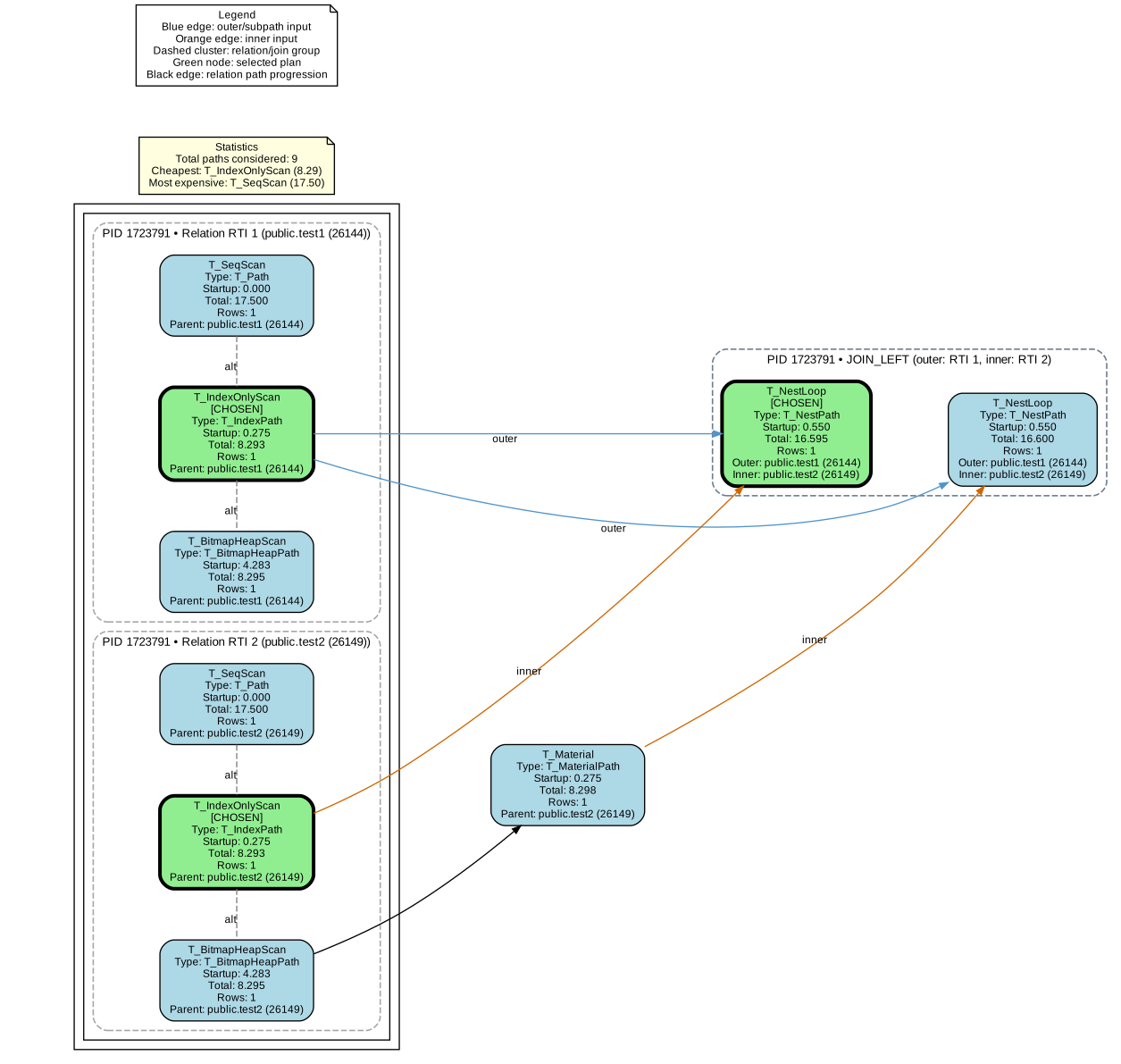
SELECT * FROM test1 LEFT JOIN test2 ON (test1.id = test2.id) WHERE test1.id=123;
The EXPLAIN output indicates that a Nested Loop Left Join is used to perform the join, which is fed by an Index Only Scan on the test1 table and an Index Only Scan on the test2 table. The Nested Loop Left Join node has an estimated cost of 0.55..16.60.
jan2=# EXPLAIN (VERBOSE, ANALYZE) SELECT * FROM test1 LEFT JOIN test2 ON (test1.id = test2.id) WHERE test1.id=123;
 QUERY PLAN
------------------------------------------------------------------------------------------------------------------------------------
 Nested Loop Left Join (cost=0.55..16.60 rows=1 width=8) (actual time=0.183..0.189 rows=1 loops=1)
   Output: test1.id, test2.id
 Inner Unique: true
 ->  Index Only Scan using test1_pkey on public.test1  (cost=0.28..8.29 rows=1 width=4) (actual time=0.139..0.143 rows=1 loops=1)
         Output: test1.id
         Index Cond: (test1.id = 123)
 Heap Fetches: 1
 ->  Index Only Scan using test2_pkey on public.test2  (cost=0.28..8.29 rows=1 width=4) (actual time=0.032..0.032 rows=1 loops=1)
         Output: test2.id
         Index Cond: (test2.id = 123)
 Heap Fetches: 1
 Planning Time: 1.116 ms
 Execution Time: 0.336 ms
(13 rows)
The plan visualization shows that different ways to access the base relations and different join algorithms were considered by the optimizer. The optimizer also considers performing a Bitmap Heap Scan on test2 and materializing the result as input for the Nested Loop join.
Conclusion
In this article, the pg_plan_alternatives tool was discussed, which uses eBPF to trace the alternative query plans that are considered by the PostgreSQL optimizer during the planning phase. The tool consists of an eBPF program that runs in kernel space and a user-space script that collects the events emitted by the eBPF program and visualizes the alternatives. By using pg_plan_alternatives, you can gain insights into the decision-making process of the optimizer and tune system parameters accordingly. Furthermore, the basics of cost-based optimization and the structure of query plans in PostgreSQL were explained. In addition, several examples were shown to demonstrate how pg_plan_alternatives can be used to inspect the alternative plans for different types of queries. The tool is open-source and can be found on GitHub.